Designing for Belonging
Overview
This study explored how blind and low-vision (BLV) adults define and experience digital inclusion. We identified barriers that persist despite implemented accessibility checklists and developed implications for future designers. We conducted four semi-structured interviews and a qualitative analysis to discover how inclusion and exclusion manifests in lived experiences beyond standard compliance checklists.
Role
UX Researcher
Affiliation
DePaul University, CDM
Areas
Accessibility
Background
Caribe Royale is a tropical resort located near major Disney and Universal theme parks in Orlando, Florida. This resort markets to families and couples looking for an upscale and relaxing getaway near the Disney and Universal park locations. This report will evaluate accessibility within the Caribe Royale homepage and the Suites & Villas subpage through a series of industry standard methodologies.
Challenge
High-traffic pages must be accessible for all users regardless of ability.
Accessibility issues must be identified through automated and manual testing in a POUR framework.
Provide high impact and accessible design recommendations.
Method
I evaluated the Caribe Royale homepage (https://www.cariberoyale.com) and the Suites and Villas subpage (https://www.cariberoyale.com/orlando-suites-villas). These two pages were chosen due to the high likelihood that a user will visit the homepage then wish to select an accommodation in the subpage. Screen captures of the homepage and subpage can be found in the appendix. The mentioned pages were evaluated using Safari and Chrome browsers, last accessed October 1st, 2025.
WAVE - Web Accessibility Evaluation
TAW - Web Accessibility Test
WebFX - Readability Test
Accessible Rich Internet Applications (ARIA) Evaluation
W3C Evaluation
Screen Reading Test
Keyboard Navigation Test
Findings
Perceivable
Guideline 1.1 Non-text Content Alternatives
Automated testing revealed four cases of missing alternative text. Upon manual inspection, similar results with specific instances of insufficient and missing text were identified such as:
The WorldHotels Rewards alternative text reads “a logo for a hotel”.
The small logos that credit prestige to the resort lack properly detailing.
The image beside the Suite Autumn Getaway text is missing alternative text.
The footer image in the homepage reads “image footer flamingo”.
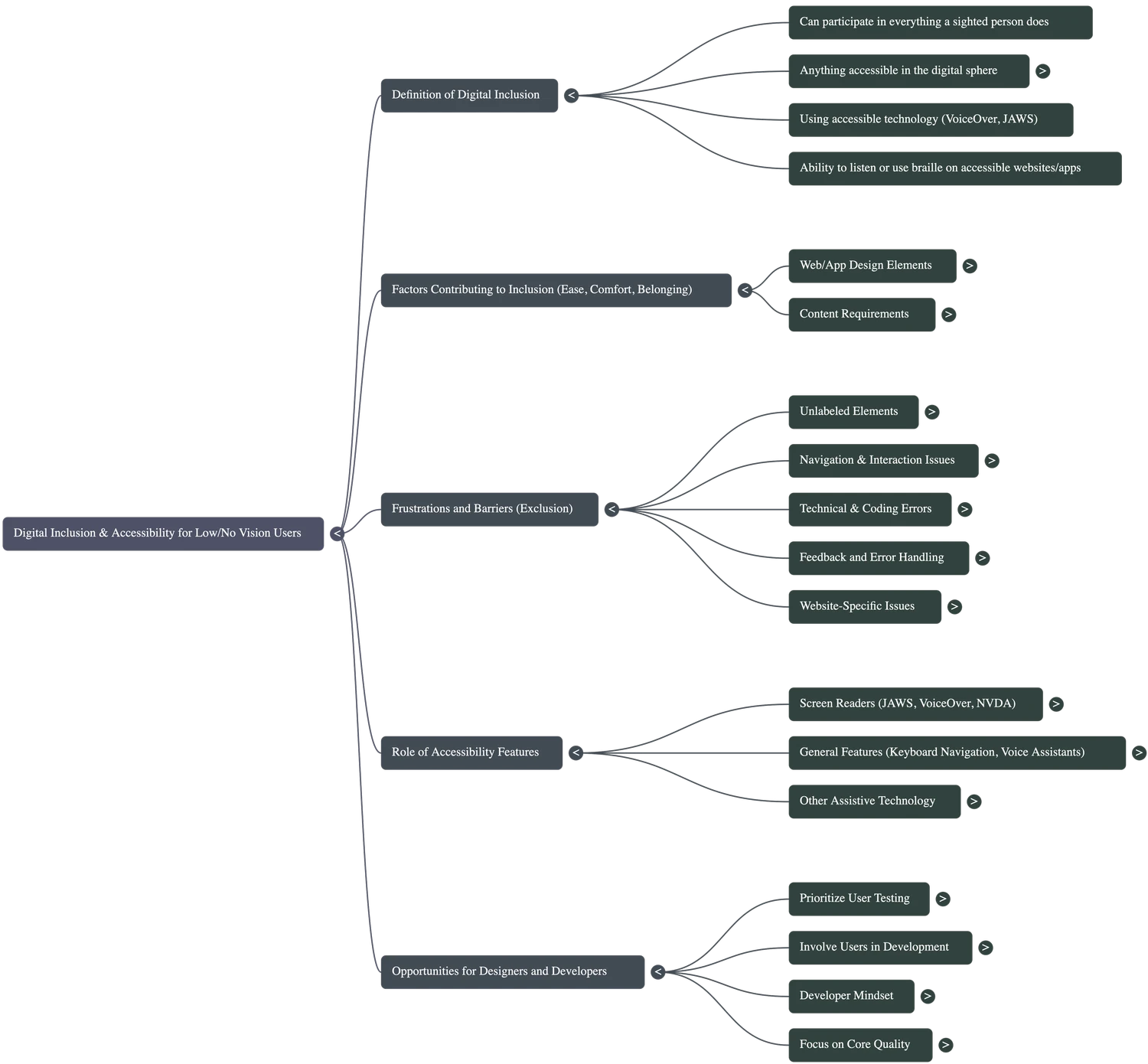
One participant summarized inclusion plainly: "I just want to use the website like anyone else."
Operable
Guideline 2.1 Keyboard
When it isn’t, they are forced into unnecessary struggles with products that often claim to be accessible. Participants relied on community and sighted peers to develop workarounds.
Understandable
Guideline 3.1 Readable
Participant #2 explained: “They obey all the formal rules, but they don’t test with anybody who actually uses it. Enough of us would love to volunteer our time.” Participant #4 emphasized the same point: “Bring people with different disabilities on the development team.” Participants strongly believe that early and continuous involvement of BLV users, rather than late-stage testing, would prevent many of the barriers they face.
Participant #2 explained: “They obey all the formal rules, but they don’t test with anybody who actually uses it. Enough of us would love to volunteer our time.” Participant #4 emphasized the same point: “Bring people with different disabilities on the development team.” Participants strongly believe that early and continuous involvement of BLV users, rather than late-stage testing, would prevent many of the barriers they face.
Supplemental Findings
Participants reported that small issues often create the biggest barriers, such as unlabelled buttons, confusing layouts, inaccessible forms, and unexpected pop-ups that slowed down tasks and increased frustration.
Participants appreciated when websites had clear structure, predictable layouts, properly labelled inputs, and descriptive alt text. These features allowed assistive tools to work correctly and made digital tasks simpler.
Participants felt motivated when digital tools worked consistently and allowed them to complete tasks independently. Reliability played a key role in their trust and confidence.
Some participants shared that they relied on community resources, online groups, peers with similar experiences, and online services that specialize in assisting BLV users. These spaces helped them discover workarounds when accessibility failed.
Implications for Designers
Integrate BLV users early and consistently in the design and testing process rather than waiting until the final stages.
Treat BLV users as co‑designers or collaborators, not only testers of finished products, to ensure meaningful change.
Prioritize structural clarity and predictable layouts since these patterns make digital environments easier to navigate and support assistive technologies reliably.
Avoid color‑only indicators, unclear validation messages, and inaccessible CAPTCHA formats, as these introduce unnecessary barriers and force users into workarounds.
These implications complement existing guidance on accessibility implementation processes and policy by emphasizing lived experience and continuous user involvement.


References
1. Gisela Reyes-Cruz, Joel E. Fischer, and Stuart Reeves. 2020. Reframing Disability as Competency: Unpacking Everyday Technology Practices of People with Visual Impairments. In Proceedings of the 2020 CHI Conference on Human Factors in Computing Systems (CHI '20). Association for Computing Machinery, New York, NY, USA, 1–13. DOI: https://doi.org/10.1145/3313831.3376767
2. Jonathan Lazar, Daniel F. Goldstein, and Anne S. Taylor. 2015. Ensuring Digital Accessibility Through Process and Policy. Morgan & Claypool Publishers. Retrieved from https://www.researchgate.net/publication/283676880_Ensuring_Digital_Accessibility_through_Process_and_Policy
3. Kristen Shinohara and Josh Tenenberg. 2009. A Blind Person’s Interactions with Technology. Communications of the ACM 52, 8 (August 2009), 58–66. DOI: https://doi.org/10.1145/1536616.1536636.
4. M. Al-Razgan, R. Alotaibi, and A. Ahmad. 2021. A Systematic Literature Review on the Usability of Mobile Applications for Visually Impaired Users. PeerJ Computer Science 7 (2021), e771. DOI: https://doi.org/10.7717/peerj-cs.771
5. Oussama Metatla, Alison Oldfield, Taimur Ahmed, Antonis Vafeas, and Sunny Miglani. 2019. Voice User Interfaces in Schools: Co-designing for Inclusion with Visually-Impaired and Sighted Pupils. In Proceedings of the 2019 CHI Conference on Human Factors in Computing Systems (CHI ’19). Association for Computing Machinery, New York, NY, Paper 378, 1–15. DOI: https://doi.org/10.1145/3290605.3300608
6. Scott Hollier. 2017. Technology, Education and Access: A “Fair Go” for People with Disabilities. In Proceedings of the 14th International Web for All Conference (W4A ’17). Association for Computing Machinery, New York, NY, Article 33, 1–2. DOI: https://doi.org/10.1145/3058555.3058557
7. Shaun K. Kane, Meredith R. Morris, Annuska Z. Perkins, Daniel Wigdor, Richard E. Ladner, and Jacob O. Wobbrock. 2011. Access overlays: improving non-visual access to large touch screens for blind users. In Proceedings of the 24th Annual ACM Symposium on User Interface Software and Technology (UIST ’11). Association for Computing Machinery, New York, NY, 273–282. DOI: https://doi.org/10.1145/2047196.2047232
8. Shaun K. Kane, Meredith Ringel Morris, and Jacob O. Wobbrock. 2017. Access overlays and inclusive technology design: Research with blind users. In Proceedings of the ACM SIGCHI Conference on Human Factors in Computing Systems (CHI ’17). Association for Computing Machinery, New York, NY, USA, 1–12. DOI: https://doi.org/10.1145/3025453.3025590
9. Simon Waller, Mark Bradley, Ian Hosking, and P. John Clarkson. 2015. Making the Case for Inclusive Design. Applied Ergonomics 46, Part B (January 2015), 297–305. DOI: https://doi.org/10.1016/j.apergo.2013.03.012
10. WebAIM. 2024. Screen Reader User Survey #10: Results. Retrieved from https://webaim.org/projects/screenreadersurvey10/
11. World Wide Web Consortium (W3C). 2023. Web Content Accessibility Guidelines (WCAG) 2.2. Retrieved from https://www.w3.org/TR/WCAG22/